
Product Modules
Partner Portal dashboard: your operations at a glance
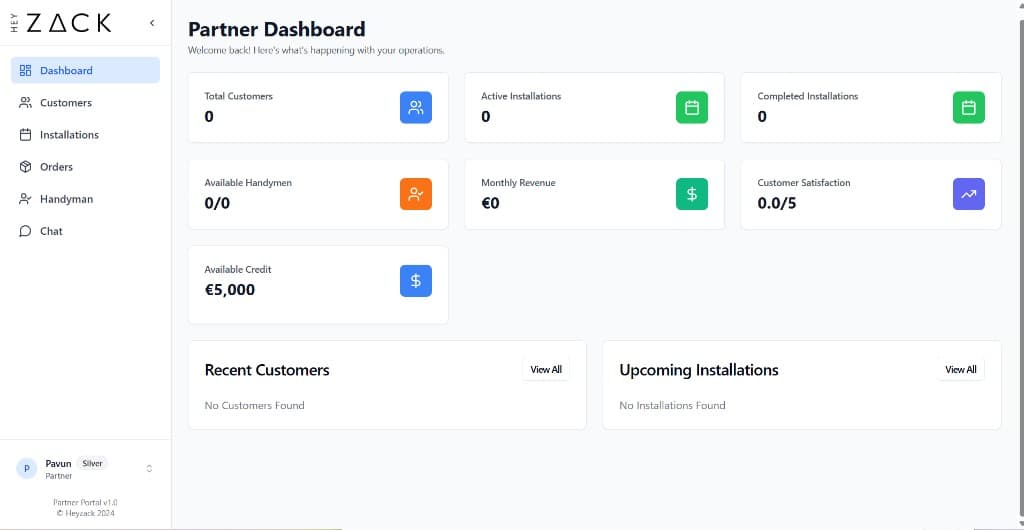
The dashboard shows live KPI cards, upcoming installations, and recent customers so you can monitor your business and act without navigating multiple sections.
The dashboard is the first page you see after signing in. It brings together the most important data from across your partner account so you can monitor your business health and act quickly without navigating to multiple sections. Every metric on this page refreshes automatically when the page loads.
What the dashboard shows
The dashboard is organised into three areas: a row of KPI cards at the top, followed by two side-by-side widgets that show your most recent customers and upcoming installations.
KPI cards
Seven at-a-glance metrics covering customers, installations, technicians, revenue, satisfaction, and available credit.
Recent customers
The five most recently added customers, with status badges and contact details.
Upcoming installations
The next five scheduled installations, sorted by date, with assigned technician names.
KPI cards
The top section displays seven KPI cards arranged in a responsive grid. Each card shows a single metric with its current value. See Understanding your dashboard KPIs for a full explanation of what each metric measures and how it is calculated.
The seven cards are:
| Card | What it shows |
|---|---|
| Total Customers | Total number of customers in your account |
| Active Installations | Total installations recorded in the system |
| Completed Installations | Installations that customers have formally approved |
| Available Handymen | Available technicians out of your total roster |
| Monthly Revenue | Your revenue for the current month in EUR |
| Customer Satisfaction | Average customer rating out of 5 |
| Available Credit | Your earned partner credits balance in EUR |
Note
The Available Credit card includes a Use Credit action. You can apply your credit balance toward a Shopify order directly from this card. See Partner tiers: benefits, revenue thresholds, and credits for full details.
Recent customers widget
The Recent Customers widget lists the five most recently added customers in your account. For each customer you can see:
- Customer name
- Email address or phone number
- Account status (active or inactive)
- The date the customer was added
Select View All to go directly to the full Customers section.
Upcoming installations widget
The Today's Installations widget shows the next five scheduled installations, ordered by the earliest scheduled date. For each entry you can see:
- Customer name and address
- Scheduled date
- Assigned technician name
Select View All to open the full Installations section where you can manage scheduling and status updates.
Navigating from the dashboard
The dashboard is a starting point, not a destination. Use it to spot anything that needs attention, then follow the links below to act on it.